What is Eaglercraft? How to Play Minecraft in Your Browser for Free

Ever wanted to play Minecraft but don't have access to the Java or Bedrock edition? Maybe you're on a Chromebook at school, a locked-down work laptop, or just don't want to spend money on the game. That's exactly where Eaglercraft comes in — a free, browser-based version of Minecraft that runs directly in your web browser. No downloads, no installs, no accounts required.

What is Eaglercraft?
Eaglercraft is a version of Minecraft that has been compiled to run entirely in your web browser using JavaScript and WebAssembly. It supports versions 1.5.2, 1.8.8, and even an unofficial 1.12 port — meaning you get access to the core Minecraft experience without ever needing to download or install anything.
Unlike the official Java or Bedrock editions, Eaglercraft connects to servers through WebSocket (wss://) connections rather than traditional TCP. This is what allows it to work inside a browser window. The best part? It's completely free to play.
For many players — especially students on Chromebooks — Eaglercraft is the only way to play Minecraft. Chrome OS doesn't support the Java edition, and the Bedrock edition has limited availability. Eaglercraft fills that gap perfectly.
What Can You Do in Eaglercraft?
Eaglercraft gives you access to multiplayer servers where you can do almost everything you'd expect from regular Minecraft:
- ●Survival — gather resources, build, and survive
- ●PvP — fight other players in KitPvP, Duels, and practice modes
- ●Minigames — play Bedwars, Skywars, Capture the Flag, and more
- ●Lifesteal — high-stakes survival where kills give you extra hearts
- ●Creative — build anything you want with unlimited resources
- ●Prison, Factions, Skyblock — classic Minecraft server game modes
The server you join determines what game modes are available. Some servers offer one or two modes, while bigger networks like KrypticMC offer a full range of survival, PvP, minigames, lifesteal, and even custom prison gameplay.

Is Eaglercraft the Same as Regular Minecraft?
Almost — but not quite. Here's what you should know:
Eaglercraft gives you a very similar experience to Java Minecraft, but it runs in a browser, so there are some trade-offs. Performance can be a bit lower on older or less powerful devices compared to a native Minecraft install. You also won't have access to mods or shaders the way Java players do.
That said, Eaglercraft is not meant to replace regular Minecraft — it's meant to be an easy, free way to play when you don't have access to other versions. And here's the great news: many popular servers now support Java, Bedrock, AND Eaglercraft all at once. That means you're playing on the same server with the same community regardless of which client you use. Servers like KrypticMC.net are a perfect example — they support all three platforms, so you never feel like a second-class player.
How to Play Eaglercraft (Step-by-Step)
Getting into Eaglercraft is incredibly simple. There are two main ways to start playing:
Method 1: Play Directly from TopEaglerServers (Easiest)
- 1Go to topeaglerservers.com
- 2Browse through the list of available Eaglercraft servers
- 3Find a server you want to play on (we recommend KrypticMC for beginners)
- 4Click the "Play" button next to the server
- 5Pick a username when the client loads
- 6You're in! Start playing immediately
This is by far the fastest way to get into Eaglercraft. No setup, no configuration — just click and play.
Method 2: Use an Eaglercraft Client Directly
- 1Visit eaglercraft.dev to find available Eaglercraft clients
- 2Choose a client and open it in your browser
- 3Click "Multiplayer" from the main menu
- 4Click "Add Server" or "Direct Connect"
- 5Enter the server's WebSocket address (e.g.,
wss://krypticmc.net) - 6Click "Join Server"
- 7Start playing!

Tips for New Eaglercraft Players
- ●Close other browser tabs — Eaglercraft runs better when your browser has more available memory
- ●Lower your render distance — if you experience lag, drop it down to 4-6 chunks in the settings
- ●Use a server that supports cross-platform play — you'll have a much bigger community and better experience
- ●Join the server's Discord — most active servers have Discord communities where you can find teammates, get help, and stay updated
- ●Try different game modes — don't just stick to survival. Minigames and PvP modes are a great way to have fun quickly
Where to Find Eaglercraft Servers
Finding good servers is one of the biggest challenges for new Eaglercraft players. Not every server is well-maintained, and some have terrible performance or no active players.
That's why we built TopEaglerServers.com — a directory of the best Eaglercraft servers, ranked and reviewed so you can find exactly what you're looking for. Whether you want PvP, survival, minigames, or something else entirely, we've got you covered.

🎮 Ready to Start Playing? We Recommend KrypticMC
If you're new to Eaglercraft and want a server that has everything — Survival, Lifesteal, Minigames, KitPvP, Duels, and a custom Prison mode — KrypticMC is the perfect place to start. It supports Eaglercraft, Java, and Bedrock, so you'll always have people to play with. The community is welcoming, the anticheat actually works, and every rank is earnable for free.
Eaglercraft Address: wss://krypticmc.net
Want to Make Your Own Eaglercraft Server?
Maybe you don't want to join a public server — you just want a private world to play with your friends. Good news: you can create your own Eaglercraft server completely for free.
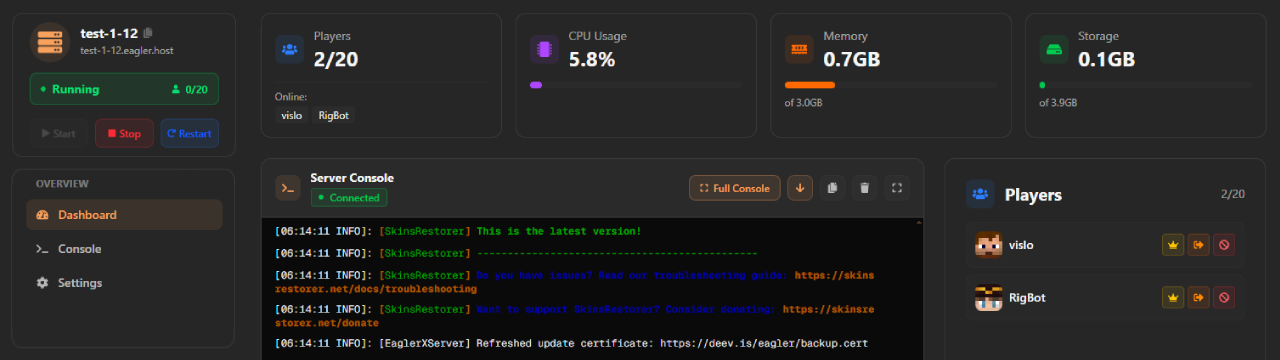
Eagler.host lets you spin up a free Eaglercraft server in minutes. No technical knowledge required, no credit card, no complicated setup. Just create your server, share the address with your friends, and start playing together.
This is a great option if you want to:
- ●Play survival with just your friend group — no random players griefing your builds
- ●Set your own rules — choose the game mode, enable or disable PvP, whatever you want
- ●Have a private world — perfect for school groups, friend circles, or just messing around
👉 Get your free server: eagler.host — create a server, share the address, and play with friends instantly.
Frequently Asked Questions
Is Eaglercraft free?
Yes. Eaglercraft is completely free to play. You don't need a Minecraft account, and you don't need to download anything.
Does Eaglercraft work on Chromebooks?
Absolutely. Eaglercraft was essentially built for Chromebooks. It runs in any modern browser — Chrome, Firefox, Edge, and more.
What versions does Eaglercraft support?
Eaglercraft supports versions 1.5.2 and 1.8.8 officially, with an unofficial 1.12 port also available on some clients.
Can I play with friends who have regular Minecraft?
Yes! Many servers support cross-platform play between Java, Bedrock, and Eaglercraft. KrypticMC is a great example of a server where all three platforms play together.
Is Eaglercraft laggy?
Performance depends on your device and browser. On very low-end hardware, you may experience some lag. Closing extra browser tabs and lowering your render distance helps a lot.
Last updated: February 2026 | Have questions about Eaglercraft? Browse our full server list to find the perfect server for you.